Citrate Core
currentCitrate Core is the desktop home for the whole federation. It is one window that holds a Citrate Keyring account, runs a full Citrate Network node, and opens onto every service in the network: the account and its staking position, a local reader for the BlockDAG, on-device AI inference, file storage, a memory graph, groups and messaging, a compute cluster, model training, and an agent workbench. One membership funds the account, covers the validator stake, and unlocks every surface. Keys are sealed in the operating system keyring and never leave the machine.
It is for people who want to hold their account and run a node on their own hardware, at home or in a business, without stitching a browser, a key-holding extension, and a server together by hand. It runs on macOS, Linux, and Windows. Chain id is 40204 (testnet beta).
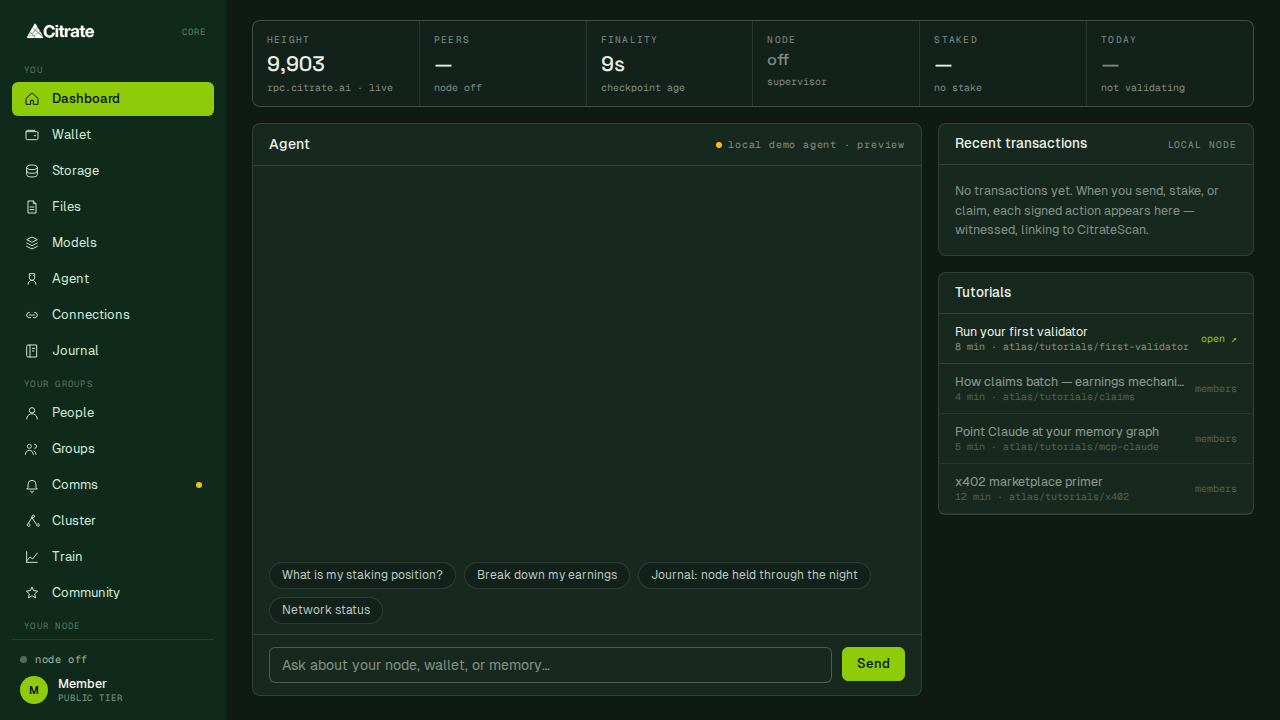
What is inside the window
The window is a left sidebar and a main surface. The sidebar groups the surfaces the way you use them
(src/shell/Sidebar.tsx):
- You holds your own things:
Dashboard, theWalletaccount view,Storage(your memory graph),Files(your storage on the network),Models,Agent,Connections, andJournal. - Your Groups holds shared things:
People,Groups,Comms,Cluster,Train, andCommunity. - Your Node holds
Node, the operator surface for the node this app runs. - More holds
Commissary,Settings, and theALFlearning surface.
The tour walks every surface with a screenshot. If you are installing for the first time, start with getting started; if you mainly came to run a node, jump to run a node.
How it is built
Citrate Core is a Tauri application: a Rust backend (src-tauri/) and a React interface (src/), packaged
as one signed desktop app. The backend supervises the node process and other local services (the inference
runtime, an IPFS node, the memory service), talks to chain id 40204, and holds the account. Every signature,
whether it comes from you, from the on-device agent, or from a background service, goes through one
human-in-the-loop approval path called the SignatureCeremony (src-tauri/src/ceremony.rs). Nothing else can
sign, and no key or recovery phrase ever crosses the interface boundary. Key handling and safe operation are
covered in keys and safety.
What it connects to
Citrate Core is a client for the live federation, not a private copy of it. It reads and writes against the same services documented across this handbook:
| Surface in Core | What it talks to |
|---|---|
Node | the Citrate Network node it runs locally, joined to chain 40204 |
Wallet | your account and its staking position, through the Citrate Keyring |
Models, Agent | on-device inference and the inference gateway |
Files, Storage | network file storage and the memory graph |
Comms, Groups | the server-blind messaging relay |
Train | federated model training rounds |
Where to go next
- Getting started installs the app and walks the first-run flow end to end.
- A tour of Citrate Core is the screen-by-screen reference.
- Run a node covers the
Nodesurface and safe operation at home or in a business. - Keys and safety covers the keyring, signing, backups, and updates.
- For agents covers operating the node and account from an agent.